Capturing smooth, sharp video is a big challenge for filmmakers. Even with modern gimbal cameras, focusing on moving subjects can be tricky. That’s where follow focus systems come in—they help you control focus smoothly while using a gimbal. If you’re new to this setup, it may look complicated. But with the right steps, you can master follow focus and improve your video quality quickly.
Table of Contents
What Is Follow Focus And Why Use It?
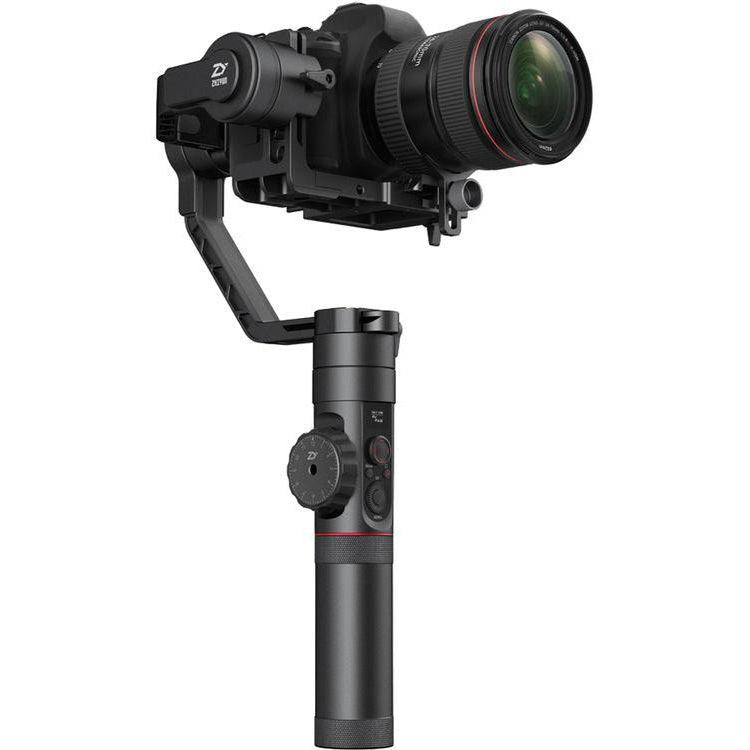
A follow focus is a tool that lets you adjust camera focus precisely without touching the lens directly. It usually has a wheel that connects to your lens through gears or cables. On gimbal cameras, a follow focus makes it possible to keep your subject sharp, even when moving.
Why is this important? Gimbals give you steady shots, but autofocus sometimes struggles with fast action or changes in distance. With follow focus, you control where the camera focuses, so your subject stays clear. This is especially helpful in interviews, sports, or cinematic shots.
Setting Up Follow Focus On Your Gimbal
Before you start filming, you need to set up the system correctly. Here’s a step-by-step guide:
1. Mount The Follow Focus Motor
Attach the motor to your gimbal’s accessory port or mounting plate. Make sure it lines up with the focus ring on your lens.
2. Connect Gear Rings
Place the gear ring around your lens’s focus ring. It should fit tightly to avoid slipping.
3. Plug In The Motor
Use the provided cable to connect the motor to your gimbal or follow focus controller. Double-check connections so nothing disconnects during filming.
4. Balance The Gimbal
After adding the follow focus, re-balance your gimbal. Extra weight can affect performance and battery life.
5. Sync The Controller
Pair the remote or handle controller with the motor. Most systems have a simple pairing button or menu.
6. Set Focus Limits
Many follow focus systems let you set start and end points. This prevents over-rotation and keeps your focus smooth.
A quick comparison of popular follow focus systems:
| System | Motor Type | Control Method | Price Range |
|---|---|---|---|
| DJI Focus | Wireless | Remote Wheel | $300–$400 |
| Tilta Nucleus-Nano | Wireless | Handheld Controller | $200–$300 |
| SmallRig Mini | Wired | Handle Knob | $100–$150 |

Credit: www.sharegrid.com
Using Follow Focus While Filming
Once your system is ready, you can start filming. Here are best practices:
- Plan Your Focus Pulls
Think about when you need to shift focus. Mark your points before you start.
- Use Slow, Steady Movements
Turn the focus wheel gently. Fast changes can make your footage look shaky.
- Watch Your Subject
Keep your eyes on the subject, not just the screen. Anticipate their movement.
- Practice with Moving Subjects
Try following someone walking or running. Adjust your speed to match their pace.
- Monitor Focus with Peaking
Use your camera’s focus peaking feature if available. It highlights sharp areas, so you know when focus is correct.
A table showing focus accuracy in different scenarios:
| Scenario | Autofocus Success Rate | Follow Focus Success Rate |
|---|---|---|
| Static Interview | 90% | 99% |
| Walking Subject | 70% | 95% |
| Fast Action | 50% | 90% |
Common Mistakes And How To Avoid Them
Even pros make mistakes when using follow focus. Here are some you can avoid:
1. Not Balancing The Gimbal
Adding a motor changes weight. If you skip balancing, your gimbal may shake or drain battery faster.
2. Loose Gear Rings
A gear ring that slips will make your focus jump. Always check it before filming.
3. Ignoring Focus Limits
If you don’t set limits, you might turn the wheel too far, losing sharpness.
4. Moving Too Quickly
Fast focus pulls look unnatural. Slow down for a cinematic feel.
5. Relying Only On Screen
Screens can lag or show inaccurate focus. Use peaking or check visually.
Beginner tip: Practice with a simple subject, like a stationary object. Once you are comfortable, try more complex scenes.
Credit: pizzavilleusa.com
Advanced Tips For Better Results
- Use Marking Disks
Some follow focus wheels have marking disks. Mark your focus points with a pen, so you can repeat moves easily.
- Remote Control for Solo Shooting
If you film alone, use a wireless remote. You can adjust focus without touching the camera.
- Combine with Autofocus
In some cameras, you can set autofocus as a backup. If you miss, autofocus can help keep things sharp.
- Check Battery Levels
Follow focus motors use extra power. Carry spare batteries for longer shoots.
- Try Focus Racking
Move focus between two objects smoothly. This adds drama to your shots.
A comparison of manual vs. follow focus systems:
| Method | Precision | Ease of Use | Best For |
|---|---|---|---|
| Manual Focus | Medium | Beginner | Simple shots |
| Follow Focus | High | Intermediate/Pro | Complex scenes |
Frequently Asked Questions
What Is The Main Benefit Of Follow Focus On A Gimbal?
The biggest benefit is precise focus control. You can keep your subject sharp, even if they move or the camera moves.
Can I Use Follow Focus With Any Camera?
Most systems work with DSLRs, mirrorless, and cinema cameras, but check compatibility before buying. Some lenses need special gear rings.
How Do I Prevent Focus Jumps During Filming?
To avoid jumps, make sure your gear ring is tight and your movements are slow. Also, set focus limits if your system allows.
Is Follow Focus Hard For Beginners?
It can feel tricky at first, but with practice and planning, most beginners learn quickly. Start with simple shots and work up.
Where Can I Learn More About Follow Focus Systems?
You can find detailed guides and reviews on B&H Photo Video, which offers expert tips and comparisons.
Using follow focus on a gimbal camera is a skill worth learning. It helps you make professional-looking videos, even in tough shooting conditions. With careful setup, slow movements, and practice, your footage will look sharper and more cinematic. Don’t be afraid to try new techniques and keep improving your skills.

Credit: www.amazon.com