Charging your camera battery may seem simple, but many beginners miss key steps that keep batteries healthy and ready for use. Whether you use a DSLR, mirrorless, or compact camera, knowing how to charge your battery properly can help you avoid missed shots and battery damage.
Here’s what you need to know for safe, fast, and effective charging.
Table of Contents
Choosing The Right Charger
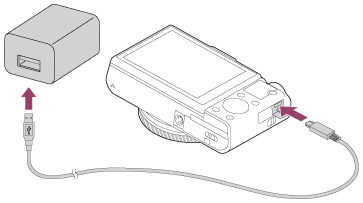
Using the correct charger is the most important step. Most camera brands supply a dedicated charger with your camera. Some cameras allow charging through USB cables, but this is not always recommended for fast or safe charging.
| Charger Type | Speed | Safety |
|---|---|---|
| Original (Brand) Charger | Fast | High |
| Generic Charger | Medium | Medium |
| USB Charging | Slow | Varies |
Always check the voltage and current rating on your charger. Using the wrong charger can damage the battery or reduce its life.
Step-by-step Charging Process
- Turn off the camera before removing the battery.
- Take out the battery and insert it into the charger.
- Plug the charger into a wall outlet. Avoid using extension cords if possible.
- Wait for the charging indicator light to show full charge (usually green).
- Remove the battery promptly after charging is complete.
Some chargers have LED indicators or digital displays. Most camera batteries charge within 1–2 hours, but this can vary. Charging for too long can cause overheating, so always monitor the process.
Credit: helpguide.sony.net
Battery Care Tips
Proper charging is only part of battery care. Here are some extra tips:
- Store batteries at room temperature (60–77°F).
- Avoid charging in hot or humid places.
- Never use damaged or swollen batteries.
- Charge batteries before long trips or important events.
| Action | Effect |
|---|---|
| Charging after full drain | Reduces lifespan |
| Partial charging | Keeps battery healthy |
| Overcharging | Causes overheating |
Many users forget that battery age impacts charging speed. Older batteries may charge slower and hold less power. Replace batteries every 2–3 years for best performance.
Common Charging Mistakes
- Using non-original chargers
- Leaving batteries charging overnight
- Charging in extreme temperatures
- Ignoring charger warning lights
Avoid these mistakes to extend battery life and prevent accidents.

Credit: www.youtube.com
Frequently Asked Questions
How Long Does It Take To Charge A Camera Battery?
Most camera batteries charge in 1–2 hours with the original charger. USB charging can take longer, sometimes up to 3 hours.
Can I Charge My Camera Battery Using A Power Bank?
Yes, if your camera supports USB charging. However, charging speed may be slower, and not all cameras allow this.
Is It Safe To Charge Batteries Overnight?
No. Overcharging can lead to overheating and shorten battery life. Remove batteries once fully charged.
What Should I Do If My Battery Feels Hot After Charging?
Let the battery cool down before using it. If it gets hot regularly, replace it or use a different charger.
How Do I Know If My Charger Is Genuine?
Check the brand label and serial number. Buy chargers from official stores or check the official website, such as Canon.
Proper charging is key for a reliable camera. By following these steps, your batteries will last longer and work better every time you shoot.