Changing the battery in your Ring camera is simple, but many users worry about missing steps or damaging the device. If your camera starts showing low battery or disconnects often, it’s time to swap the battery. This guide will help you change your Ring camera battery safely, avoid mistakes, and keep your security system running smoothly.
Table of Contents
Preparing To Change The Battery
Most Ring cameras use a removable battery pack. Before you start, make sure you have:
- A fully charged Ring battery pack
- A small screwdriver (if needed for your model)
- Clean hands to avoid smudges on the camera lens
Check the camera type. Some models, like the Ring Stick Up Cam and Ring Doorbell 2, use the same battery. Others, like the Ring Doorbell Pro, don’t have removable batteries.
Here’s a quick comparison of popular Ring models:
| Model | Battery Type | Removable? |
|---|---|---|
| Ring Doorbell 2 | Rechargeable | Yes |
| Ring Stick Up Cam | Rechargeable | Yes |
| Ring Doorbell Pro | Hardwired | No |
Step-by-step Battery Replacement
Follow these steps to change your Ring camera battery:
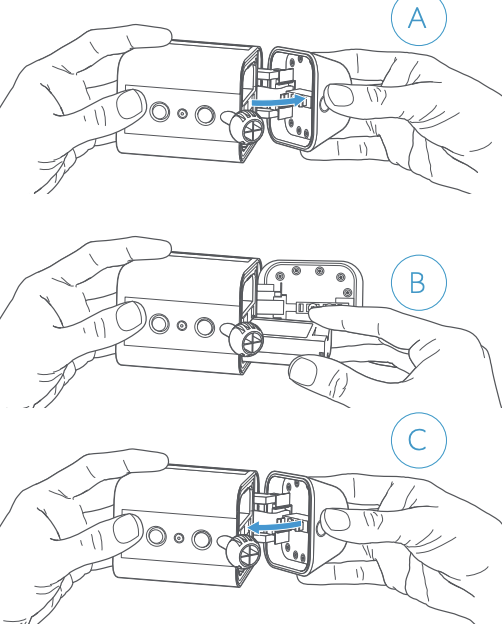
- Remove the camera or cover: For doorbells, unscrew the security screw at the bottom. For cameras, open the back compartment.
- Take out the battery: Gently slide out the battery pack.
- Insert the new battery: Place the charged battery in the same orientation. Push until you hear a click.
- Secure the cover: Reattach the cover and tighten screws.
- Test the device: Wait a few minutes. The camera should reconnect automatically.
Most batteries last about six months. If your battery drains faster, check for settings like high sensitivity or frequent motion alerts.
Here’s a battery life comparison based on usage:
| Usage | Average Battery Life |
|---|---|
| Low Activity | 6+ months |
| Medium Activity | 4-6 months |
| High Activity | 2-4 months |

Credit: www.youtube.com
Practical Tips For Longer Battery Life
- Lower motion sensitivity in your Ring app.
- Turn off unnecessary alerts.
- Install your camera where it gets less direct sunlight and rain.
Many users forget to charge their backup battery. Always keep one fully charged for emergencies. Also, avoid using third-party batteries; these may damage your device and void the warranty.
Frequently Asked Questions
How Long Does It Take To Charge A Ring Battery?
It takes about 5-10 hours to fully charge a Ring battery using a micro-USB cable.
Can I Use My Ring Camera While Charging?
No, you must remove the battery to charge it. The camera will be offline during charging.
What Happens If I Use A Non-ring Battery?
Using a third-party battery can cause compatibility issues or damage. Always use official Ring batteries.
How Do I Check The Battery Status In The Ring App?
Open the Ring app, select your device, and look for the battery indicator on the main screen.
Is It Safe To Leave My Ring Battery Charging Overnight?
Yes, Ring batteries have safety circuits to prevent overcharging. However, unplug it once fully charged.
Changing your Ring camera battery is quick and keeps your security system reliable. For extra help and troubleshooting, visit the official Ring Support site. Always use genuine Ring batteries for best results.
Credit: ring.com