If your Arlo camera is flashing orange, it can be confusing and worrying. Many users face this issue, but few know exactly what it means or how to fix it. An orange light is not just a random signal; it usually points to a specific problem with your device. Understanding these signals can help you fix your camera faster and avoid missing important footage.
Table of Contents
What Does The Orange Light Mean?
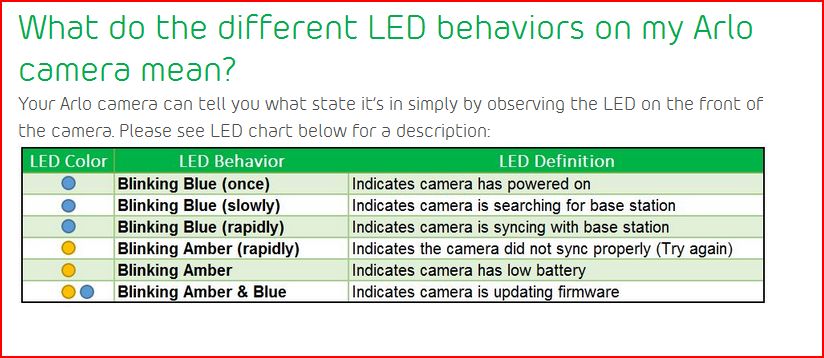
The orange flashing light is a warning indicator. On Arlo cameras, this can signal:
- Low battery
- Network connection issues
- Firmware updates
- SD card problems (for some models)
Most often, the orange light means your camera needs attention. Below, you’ll see how to spot which problem is affecting your device.
| Orange Flash Pattern | Common Cause | Solution |
|---|---|---|
| Rapid flashing | Low battery | Recharge or replace battery |
| Slow flashing | Network issue | Check Wi-Fi connection |
| Solid orange | Firmware update | Wait for update to finish |
Common Reasons For Orange Light
1. Low Battery
Most Arlo cameras flash orange when battery levels drop below 15%. If you see rapid flashes, check the battery status in the Arlo app. If it’s low, charge or replace the battery immediately.
2. Network Problems
A slow orange flash can mean the camera lost its Wi-Fi signal. This happens if the router is too far or there’s interference. Move your camera closer to the router or restart your network devices.
3. Firmware Update
A solid orange light means your camera is updating its software. Do not turn off or move the camera during this time. Updates often improve security and performance, so let it finish.
4. Sd Card Issues
Some models flash orange if the SD card is not detected or is corrupted. Remove the card, check it in a computer, and reinsert it properly. If the problem continues, try a new SD card.
| Model | SD Card Support | Orange Light for SD Issues |
|---|---|---|
| Arlo Pro 2 | Yes | Yes |
| Arlo Ultra | Yes | Yes |
| Arlo Essential | No | No |

Credit: clinicaizabelapiresfranco.com.br
How To Fix The Orange Light
Follow these steps:
- Check the battery level in the app and recharge if needed.
- Ensure your camera is within Wi-Fi range.
- Wait for firmware updates to finish.
- Inspect and reinsert the SD card.
If none of these fixes work, reset your camera or contact Arlo support.
Frequently Asked Questions
Why Does My Arlo Camera Flash Orange After Charging?
This usually means a network issue or a firmware update is in progress.
Can The Orange Light Affect Recording?
Yes, if the battery is low or there’s a network issue, recording may stop.
Is The Orange Light Dangerous?
No, it’s just a warning signal. It shows your camera needs attention, not that it’s unsafe.
How Long Does A Firmware Update Take?
A typical update takes 2–5 minutes. If it takes longer, restart your device.
Where Can I Find More Information?
Visit the Arlo Support Site for detailed troubleshooting guides.
Understanding your Arlo camera’s orange light can save you time and frustration. Fix the issue quickly, and your camera will continue protecting your home. If problems persist, reach out to Arlo support for expert help.
Credit: community.arlo.com