Mounting a Ring Indoor Camera is a simple process that gives you better home security. With its compact size and easy setup, the Ring Indoor Camera is a popular choice for people who want to monitor their home. This guide explains how to mount your camera step-by-step, shares helpful tips, and answers common questions.
Whether you’re a beginner or have some experience with smart devices, you’ll find everything you need to get started.
Table of Contents
Choosing The Best Location
Placement is the first step. The Ring Indoor Camera works best when it covers main areas, like living rooms, entryways, or hallways. Avoid pointing the camera directly at windows, as sunlight can affect the video quality.
| Area | Visibility | Activity Level |
|---|---|---|
| Living Room | Wide | High |
| Entryway | Focused | Medium |
| Bedroom | Moderate | Low |
Two often-missed insights: First, place the camera at least 6 feet above the floor for better coverage. Second, avoid corners where Wi-Fi signals may be weak.
Tools And Materials Needed
You don’t need special tools for mounting the Ring Indoor Camera. Here’s what you’ll need:
- Ring Indoor Camera and included stand
- Screws (provided)
- Screwdriver or drill
- Wall anchors (optional, for drywall)
- Smartphone for setup
Most users skip wall anchors, but they are important if your wall is not solid wood or concrete.
| Tool | Purpose | Included? |
|---|---|---|
| Screwdriver | Mount base | No |
| Screws | Attach stand | Yes |
| Wall anchors | Secure on drywall | No |

Credit: www.youtube.com
Step-by-step Mounting Guide
Follow these steps to mount your camera securely:
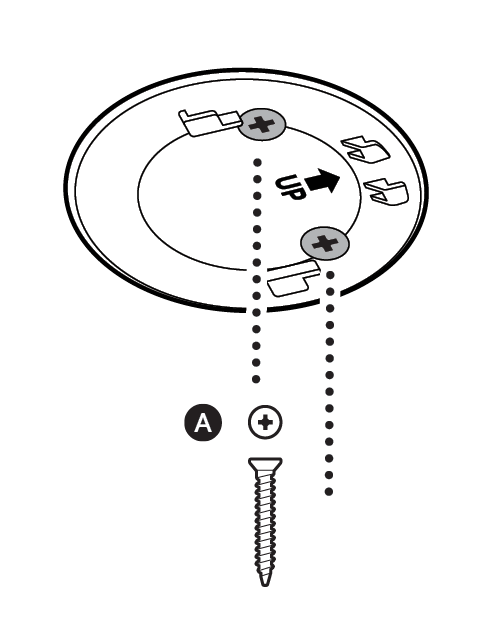
- Decide on the location and mark the holes using the camera’s base.
- If mounting on drywall, insert wall anchors first.
- Use a screwdriver or drill to secure the base with screws.
- Attach the camera to the stand and adjust its angle.
- Plug the camera into a power outlet and connect to Wi-Fi using the Ring app.
Tip: Test the camera’s view before final tightening. Many people forget this step, and the camera ends up facing the wrong way.
Additional Tips For Setup
- Keep the camera away from heat sources and moisture.
- Check the Wi-Fi signal strength before mounting.
- Update the camera firmware after setup for best performance.
If you want more details about Ring Indoor Camera features and compatibility, visit the official Ring Support.
Credit: ring.com
Frequently Asked Questions
How High Should I Mount My Ring Indoor Camera?
For the best view, mount it 6–8 feet above the floor. This covers most rooms and avoids blind spots.
Can I Mount The Camera On The Ceiling?
Yes, the stand allows ceiling mounting. Make sure the camera is stable and the cord can reach the power outlet.
Does The Camera Work If Placed On A Shelf?
It works on a flat surface, but mounting gives wider coverage and prevents accidental movement.
Is It Okay To Mount The Camera Near A Window?
Avoid placing it directly facing a window, as glare and sunlight can reduce video quality.
What Should I Do If The Wi-fi Signal Is Weak?
Try moving your router closer or use a Wi-Fi extender to improve the signal before mounting the camera.