Most people shopping for a home security camera want to see what is happening at home and get an alert when something moves. The seven picks here split on where the camera goes, how it gets power, and how much you want it to do on its own. A doorbell camera, an indoor pan camera and a battery outdoor camera solve different problems, so the right one depends on where you need to look.
Best overall: Ring Battery Doorbell 2K. It covers the front door with 2K video, offers up to 6x zoom, and has two-way talk built in. It runs on a battery that you recharge over USB-C, so you don’t need to run wire to the door.
Best indoor pick: Blink Mini 2K+. It plugs into an outlet, gives you 2K video with up to 4x zoom and noise-cancelling two-way talk, and sets up in just minutes.
Best for moving the view: Kasa EC71 Pan Tilt. It pans and tilts across a full room and can track movement, which suits anyone who wants one camera to cover a lot of space.
This guide is for people who want a simple camera that works from the first day, whether it watches the front door, a room or the yard.
Table of Contents
How We Picked
We compared the Amazon listings for these home security cameras. To earn a place here, a listing had to state the key facts a buyer needs: video resolution, how the camera gets power, what storage options it offers, and what is included in the box.
Those four facts matter because they decide how the camera will work in your home. Resolution tells you how much detail you’ll see when you review footage. Power decides where you can mount the camera, since a battery model can go almost anywhere while a plug-in model needs an outlet nearby. Storage determines whether you can look back at recordings at all, and the listing needs to say whether that means a microSD card you buy separately, a paid cloud plan, or both. The box contents tell you whether you need to buy a power adapter, a mounting kit or a card before the camera will run.
If a listing didn’t state a fact clearly, we treated that as a reason to leave it out rather than fill the gap with an assumption.
Those were set aside so the list stays focused on cameras you can set up and use for watching a room or entryway.
| # | Product | ||
|---|---|---|---|
| 1 | 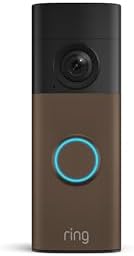 | Ring Battery Doorbell 2K Top Pick | Check Price |
| 2 |  | Blink Mini 2K+ Best for Pet Monitoring | Check Price |
| 3 |  | Kasa EC71 Pan Tilt Also Great | Check Price |
| 4 |  | WYZE Cam Pan v3 | Check Price |
| 5 |  | Gyozol 2K Wireless Best for Outlet-Free Spots | Check Price |
| 6 |  | AOQEE 2K C1 Best for Two-Camera Sets | Check Price |
| 7 |  | GNCC 2K Indoor Best for First-Time Setup | Check Price |
1. Ring Battery Doorbell 2K (newest model)
Best for: Front door monitoring without running new wiring.
The Ring Battery Doorbell 2K records in 2K with a wide view of the entry area. Live View and Two-Way Talk let you see and speak to visitors as they arrive. Because it runs on a built-in battery, it can go almost anywhere a doorbell can. The trade-off is that the battery must be recharged from time to time, which you do by removing the doorbell with the included tool and plugging it into USB-C. The listing says the cable isn’t included, so keep one handy.
Its listed AI-powered alerts, video history and other extras need a Ring Protect subscription, which is sold separately. If you want the camera to be useful beyond live viewing, plan for that subscription. The Blink Mini 2K+ is a better fit for watching the inside of the house, not the front step.
Pros
- 2K video with a wide view
- Up to 6x zoom to inspect details
- Two-way talk and live view
- Built-in battery, no wiring needed
Cons
- Battery needs recharging by removing the unit
- Cloud features require a separate subscription
2. Blink Mini 2K+ (newest model)
Best for: Indoor monitoring of a room or pet area with a plug-in camera.
The Blink Mini 2K+ is a compact plug-in camera with 2K video and up to 4x zoom. Its listing highlights improved audio with noise cancellation, so two-way conversations sound clearer. It can be placed on a shelf or mounted, and the listing says setup takes just minutes. It can also act as a plug-in chime for a Blink Video Doorbell, which is sold separately.
Because it plugs into power, it runs continuously and needs no battery. That makes it a good fit for a spot where you can reach an outlet and don’t want to change batteries. Think of a living room shelf, a kitchen counter, or a corner where a pet spends most of its day. The 4x zoom helps when you need a closer look at something across the room, such as a pet’s behavior or a package left near the door.
For use outside, the listing says you need the Weather Resistant Power Adapter, which is sold separately. Check that before you buy if you plan to mount it on a porch or in a garage with an open side. Smart detection for people and vehicles requires an optional Blink Subscription Plan. Without the subscription, you still get live viewing and two-way talk, but you won’t get those detection alerts. If you want an outdoor camera that runs on a battery, the Gyozol 2K Wireless is built for that job.
Pros
- 2K video with up to 4x zoom
- Noise-cancelling two-way talk
- Quick plug-in setup
- Can act as a doorbell chime
Cons
- Outdoor use needs a separate power adapter
- Smart detection requires an optional subscription
3. Kasa 1080p Indoor Pan/Tilt Wired Security Camera
Best for: One indoor camera that needs to cover a whole room.
The Kasa EC71 Pan Tilt covers 360 degrees horizontally and 113 degrees vertically, so a single unit can see across a room or down a walkway. That wide range is what makes it useful for a room with several corners to watch, since you don’t need a second camera to cover the blind spots a fixed lens would leave behind.
Motion tracking can automatically follow moving people or objects. If you’d rather not watch one spot constantly, patrol mode lets you set the camera to check each area at intervals you choose. That turns a single camera into a rotating check of the whole room.
Pan and tilt are also what make the camera good for pets and babies. A fixed camera can miss a pet that wanders behind furniture, but a camera that turns to follow movement keeps the animal or child in frame. The built-in 2-way audio lets you talk back through the camera from your phone, which is useful when you want to calm a pet or check on someone without going into the room.
It records in 1080p Full HD video.
Storage is flexible. You can insert a microSD card up to 256 GB to record continuously on the camera itself, which isn’t included, so buy one before you set up. Or you can pay for Kasa Care, which stores 30 days of video in the cloud and adds features such as video summaries and activity notifications with snapshots. Choose local storage if you want to avoid a monthly fee and don’t need footage offsite. Choose the cloud option if you want to review past events from anywhere and don’t want to remove a card to see what happened.
The listing describes it as an indoor camera, so for a yard the outdoor-rated WYZE Cam Pan v3 is the closer match. It also connects over 2.4GHz Wi-Fi only, so check that your router broadcasts that band before you buy. The WYZE Cam Pan v3 covers a similar range and can be used outdoors, which makes it the more flexible choice if you want both.
Pros
- 360-degree pan and wide tilt coverage
- Motion tracking and patrol mode
- Night vision up to 30 feet
- Local microSD or optional cloud storage
Cons
- Made for indoor use only
- Connects on Wi-Fi only
4. WYZE Cam Pan v3
Best for: Buyers who want one camera for both indoor and outdoor spots.
The WYZE Cam Pan v3 pans 360 degrees and tilts 180 degrees, with Full 1080p video and vivid color night vision. Its listing says it has an IP65 rating and can be used outdoors with an outdoor power adapter, which is sold separately. AI-powered motion tracking follows people and pets, and you can set custom motion zones to limit alerts to the areas you choose. Storage can be a microSD card up to 512 GB or cloud recording with Wyze Cam Plus.
The pan and tilt range is what makes this camera flexible. A fixed camera only sees the area it was aimed at, but this one can be set to sweep a room or a yard and can also store up to four custom waypoints, so it moves to each spot in turn. That’s useful if you want to cover more than one area without buying a second camera.
Motion zones matter most in the places where the camera sees a lot of movement, such as a street, a neighbor’s yard, or a window with passing traffic. Drawing zones around the spots you care about cuts down on alerts you would otherwise ignore.
Storage is the other choice to make early. A microSD card keeps footage local and has no monthly fee, while Wyze Cam Plus adds cloud recording. The listing describes the card and the cloud plan as two separate options rather than something you need both of.
Setup uses Bluetooth pairing rather than a QR code, and the listing says it’s not 5G compatible. If you only need a camera at the front door, the Ring Battery Doorbell 2K is simpler. For a room that needs a wide sweep, the Kasa EC71 is the closer match.
Pros
- 360-degree pan and 180-degree tilt
- Color night vision and 1080p video
- IP65 rating for outdoor use
- Custom motion zones reduce false alerts
Cons
- Outdoor use needs a separate power adapter
- Not 5G compatible
5. Gyozol 2K Security Cameras Wireless Outdoor
Best for: Outdoor spots with no power outlet nearby.
The Gyozol 2K Wireless runs on a rechargeable battery, so you can mount it in a yard, on a deck or in a garage without running cable. That matters most where the nearest outlet is far away or hard to reach. You don’t have to plan a cable route before you can start watching the spot.
It records 2K video with color night vision that you can switch on from the app. Night vision works in two modes, so you choose the one that fits the spot. Standard infrared gives you black-and-white footage with the spotlight off. Turning on the high-brightness spotlight gives you full color, which can help you identify a person or a vehicle after dark.
The PIR motion sensor sends an alert to your phone when it detects movement, and you can adjust its sensitivity in the app. Two-way talk lets you speak through the camera. The siren and flashing light can be used to warn off visitors you don’t want around.
Storage is a microSD card up to 128 GB, which saves footage locally without a monthly service. The other option is an encrypted cloud service, which comes with a 3-day trial. After the trial you need a subscription to keep using it. The listing notes that footage stored in the cloud stays safe even if the camera itself is damaged, which is useful for outdoor spots where theft or weather could be a concern.
The listing says battery life depends mainly on how often the camera is triggered. A full charge is rated at about 2,400 to 2,600 triggers in lab testing, and actual results will vary. The strength of the 2.4GHz Wi-Fi signal also matters, because a stronger signal uses less power to transmit. Extreme heat or cold can shorten the charge too. So place the camera where your phone shows a strong connection, and expect the battery to last longer on a quiet spot than on a busy driveway.
It works only on the older Wi-Fi band that most routers still broadcast alongside the faster one. If your router broadcasts both Wi-Fi bands under one network name, check that the camera can connect before you mount it. The AOQEE 2K C1 is also made for outdoor use, but it’s wired, which means it runs all day without a recharge.
Pros
- Battery-powered, no wiring needed
- 2K video with color night vision
- Built-in siren and flashing light
- Local or cloud storage options
Cons
- Battery life depends on use and Wi-Fi strength
- Works only on the older Wi-Fi band
6. AOQEE 2K C1
Best for: Covering two spots at once with a two-camera set.
The AOQEE 2K C1 comes as a two-pack, so you can cover two areas in one order. That matters most when the two spots are far apart, such as a front door and a back yard, because you get both views without buying a second system. Each camera records 2K video with color night vision, so you can still see what is happening after dark, not just in daylight.
Two-way talk works through the phone app. The camera has a noise-canceling microphone and speaker, so you can speak with a family member, a pet, or a visitor at the door. Motion alerts arrive on your phone, and a built-in siren can scare off intruders. The siren is worth testing once after setup so you know how loud it’s in your space.
The camera is rated IP65, so it can stay outdoors in rain and dust. Installation is simple: it can be mounted on walls, shelves, trees, or roofs. Choose a mounting spot where the camera faces the area you want to watch.
Recording can run 24/7 to a microSD card up to 128 GB, which isn’t included, or to cloud storage with a 30-day trial. Storage is one of the first decisions to make. Cloud storage keeps copies off site, but the trial is only 30 days, so check the ongoing subscription before you rely on it.
The camera is wired to power, not battery-operated, and it connects over the older Wi-Fi band. Before you buy, confirm that each mounting spot has a power outlet within reach and a Wi-Fi signal strong enough to hold a stable connection. If a spot has no outlet, this set is the wrong choice for that location, and a battery model such as the Gyozol 2K Wireless will suit it better.
Pros
- Two cameras in one set
- 2K video with color night vision
- IP65 rating for outdoor use
- 24/7 recording with local or cloud storage
Cons
- Each camera needs a nearby power outlet
- Connects on 2.4GHz Wi-Fi
7. GNCC 2K Security Camera Indoor
Best for: A first camera for someone who wants easy setup and little fuss.
The GNCC 2K Indoor records 2K video with 10 meters of night vision and uses AI motion tracking with a wide 340-degree pan. It connects on both Wi-Fi bands, and the listing says Bluetooth pairing makes setup quick. If the camera sits far from your router, the older, longer-reaching Wi-Fi band is the one to rely on.
You manage it through one app, the OSAIO app, and you can customize monitoring zones. That’s useful when you care about a specific spot, like a crib or a front door, and want alerts only from that area rather than from the whole room. Two-way audio is built in, so you can talk to whoever is in the frame, whether that’s a child, a pet, or a visitor.
Storage is the decision that shapes how you’ll use the camera. You can use a microSD card from 16 to 128 GB, which records continuously to the card, or a cloud plan with a 14-day free trial. The SD card isn’t included, so buy one before you set up the camera. Choose the SD card if you want to keep footage locally and avoid a monthly fee. Choose cloud if you want to review clips from your phone away from home.
The listing notes that video playback needs either a cloud subscription or an inserted SD card. Without one of those, you get live view only. If you need outdoor coverage, the WYZE Cam Pan v3 is rated for it.
Pros
- 2K video with 10-meter night vision
- Dual-band Wi-Fi support
- Quick Bluetooth pairing
- One app for all cameras
Cons
- Playback needs an SD card or cloud plan
- Made for indoor use
How to Choose an Easy Home Security Camera in Sixty Seconds
Decide where the camera goes first
A doorbell camera suits the front step, an indoor camera suits a room, and an outdoor camera suits the yard. Start with the spot you need to watch, then look for the product that fits it. Picking the wrong type of camera for the spot is the most common mistake buyers make.
Match the camera to the view you need. The Ring Battery Doorbell 2K is built for a front door, with a wide view and two-way talk. The Blink Mini 2K+ and the Kasa EC71 Pan Tilt are indoor cameras, and the Kasa can turn to cover a whole room or walkway. The WYZE Cam Pan v3 is rated IP65 and can be used indoors or outdoors. The Gyozol, AOQEE and VISION WELL cameras are listed for outdoor use, while the GNCC and Cinnado are listed for indoor use only.
Check how it gets power
A plug-in camera runs all the time but needs an outlet nearby. A battery camera can go anywhere but needs recharging, and its life depends on how often it’s triggered. Look at the power option before you buy, and check the listing for any adapter that’s sold separately.
Battery runtime is tied to how often the camera records. The Gyozol listing says a full charge supports about 2,400 to 2,600 motion triggers in lab testing, and notes that actual results vary. Weak WiFi and extreme temperatures can also shorten battery life, so a spot with a strong signal helps. The Ring doorbell is also battery powered, but its listing says it recharges through USB-C, with the cable not included.
Confirm what is included before ordering
Many listings sell storage cards, power adapters, cables and subscriptions separately. Read the included items and the optional extras carefully. If you want cloud features, check that the subscription is listed for the camera you choose.
Check the WiFi band as well. Several listings say they support only 2.4GHz WiFi, including the Gyozol, the Cinnado and the VISION WELL. The WNEDSU camera can use either 2.4GHz or 5GHz, but its listing points out that 5GHz means WiFi, not 5G cellular. If your router runs only one band, make sure the camera matches it before you buy.
Frequently Asked Questions
Do I need a subscription to use these cameras?
Not always. Many cameras record to a microSD card or let you watch live without one. Smart alerts, video history and cloud storage are usually extra. The Ring Battery Doorbell 2K and the Blink Mini 2K+ both list their advanced features as optional subscriptions, so check that part of the listing before you buy.
Can I use an indoor camera outside?
Only if the listing says. The Kasa EC71 is made for indoor use, while the WYZE Cam Pan v3 is rated for outdoor use with an outdoor power adapter sold separately. Check the weather rating and the power option, since an indoor camera left in the rain can fail.
Which camera is easiest to set up?
The Blink Mini 2K+ and the GNCC 2K Indoor both list quick setup. The Blink needs only a power outlet, and the GNCC uses Bluetooth pairing. The WYZE Cam Pan v3 also uses Bluetooth pairing rather than a QR code. Any camera will take a few minutes, so pick the one that fits the power and placement you already have.
What Wi-Fi band do these cameras need?
Most of the cameras here connect on the older, longer-reaching Wi-Fi band, and several list that band only. The GNCC 2K Indoor supports both 2.4GHz and 5GHz. Check your router and the camera’s listing before you buy, and place the camera where your phone shows a strong signal.
Closing
If you want one pick, the Ring Battery Doorbell 2K is the strongest for the front door, and the Blink Mini 2K+ is the strongest for indoor monitoring. Choose the spot you need to watch, check the power option, and confirm which extras are included before you order. Then look over the current listings on Amazon.