Putting your Blink camera back on its mount can be simple, but it’s easy to miss small steps that keep your device secure and working well. Many people struggle with loose cameras, poor angles, or even damaging the mount itself. With a few careful moves, you’ll get your camera back in place and ready to monitor your home.
Table of Contents
Checking The Blink Camera And Mount
Before you try to remount, inspect both the camera and its mount for damage or dirt. If the camera has been dropped or exposed to weather, look for cracks or loose parts.
- Clean the mount with a soft cloth.
- Make sure the mounting slot is not bent.
- Check the camera’s battery cover is closed.
Here’s a quick comparison of common Blink mounts:
| Mount Type | Best For | Secure Level |
|---|---|---|
| Standard Clip | Indoor use | Medium |
| Swivel Mount | Outdoor, flexible angle | High |
| Magnetic Mount | Quick setup | Low |
Always use the right mount for your camera’s location. Using a weak mount outdoors can lead to falls or water damage.
Step-by-step: Putting Blink Camera Back On Mount
Follow these steps for a secure fit:
- Align the camera’s slot with the mount’s clip or peg.
- Gently press the camera against the mount until you hear a click or feel it lock in place.
- Adjust the angle of the camera for the best view.
- Test the camera feed from your Blink app to confirm it’s aimed correctly.
Don’t force the camera if it doesn’t fit. If you feel resistance, check for debris or misalignment.
Here’s a quick guide for different Blink models:
| Model | Mounting Method | Extra Steps |
|---|---|---|
| Blink Outdoor | Clip-on | Check weatherproof seal |
| Blink Indoor | Swivel bracket | Angle for room coverage |
| Blink Mini | Magnet | Test stability |

Credit: support.blinkforhome.com
Common Mistakes And How To Avoid Them
Many users rush the process and miss key steps. Here’s what to avoid:
- Mounting on uneven surfaces, which can cause the camera to fall.
- Ignoring battery cover alignment.
- Not checking for a secure click.
A non-obvious tip: If your camera keeps falling, try adding a small piece of double-sided tape to the mount for extra grip. Also, always update your Blink app after remounting—the app sometimes needs a refresh to detect the new angle.
Frequently Asked Questions
How Do I Know If My Blink Camera Is Securely Mounted?
Check for a firm click and gently shake the camera. If it doesn’t move, it’s secure.
Can I Use Any Mount With My Blink Camera?
No. Use only Blink-approved mounts for your model to avoid damage.
What Should I Do If My Camera Keeps Falling Off?
Clean both surfaces and try repositioning. If it still falls, replace the mount.
Is It Safe To Mount Blink Cameras Outdoors?
Yes, but use the weatherproof Outdoor model and make sure seals are tight.
Do I Need Tools To Mount Blink Cameras?
Usually not. Most mounts are designed for hand assembly. Only use tools if the mount requires screws.
For more details, check Blink’s official guide: Blink Support.
Getting your Blink camera back on its mount is easy with careful steps and the right mount. Take your time, double-check the fit, and your camera will keep your home safe and secure.
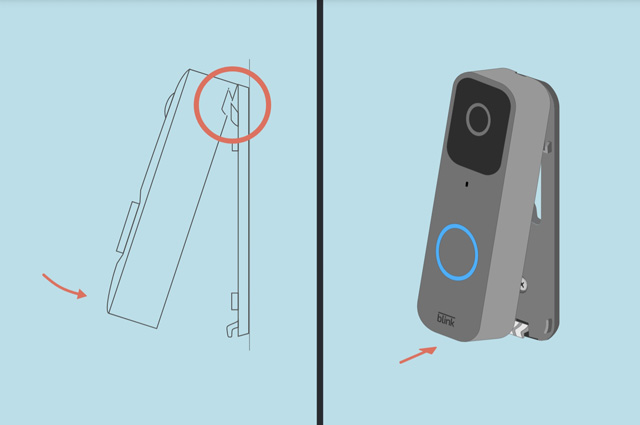
Credit: support.blinkforhome.com