Attaching a camera strap to your Canon camera might look simple, but doing it correctly protects your gear and improves your shooting comfort. Many new photographers make small mistakes that can lead to dropped cameras or tangled straps. This guide will show you clear steps to attach your Canon camera strap, share practical tips, and help you avoid common errors.
Table of Contents
Why A Camera Strap Matters
A camera strap is more than an accessory. It prevents accidental drops, reduces hand fatigue, and keeps your camera ready for action. Canon straps are designed for both comfort and durability. If you’re shooting outdoors or traveling, a secure strap is essential.
Step-by-step: Attach Your Canon Camera Strap
Follow these steps to attach your strap safely:
1. Locate The Strap Mounts
Most Canon cameras have two metal eyelets on each side of the body.
2. Thread The Strap Through The Mount
Insert the thin end of the strap through the eyelet from underneath. Use the plastic or leather tab (often attached) to help guide it.
3. Pull The Strap Through The Buckle
Slide the end through the plastic fastener (buckle) on the strap. Make sure it goes through both slots—this keeps the strap tight.
4. Adjust And Secure
Pull the strap so it’s snug. Make sure the strap lies flat and isn’t twisted. Repeat for the other side.
5. Double-check Security
Tug gently on both sides to confirm the strap is locked. Loose ends can slip—so check before hanging the camera.
Below is a simple comparison of Canon strap types:
| Strap Type | Comfort Level | Best For |
|---|---|---|
| Standard Neck Strap | Medium | General Photography |
| Shoulder Sling | High | Long Shoots |
| Hand Strap | Low | Quick Shots |

Credit: www.youtube.com
Common Mistakes And How To Avoid Them
Many beginners make these errors:
- Twisting the strap before securing, which causes discomfort and can loosen the connection.
- Incorrect buckle threading—missing a slot means the strap can slip.
- Forgetting to check security—always test by gently pulling.
Here’s a quick checklist for strap safety:
| Check | Result |
|---|---|
| Strap lies flat | No twists |
| Buckle tight | Secure hold |
| Pulled gently | No slipping |
Practical Tips For Comfort And Safety
- Adjust the length for your body size—too long or short can cause strain.
- Clean the strap regularly, especially after outdoor shoots.
- Consider padded straps for heavy cameras.
- Replace the strap if you notice wear or fraying.
For more detailed visual instructions, you can check the official Canon guide at Canon Support.
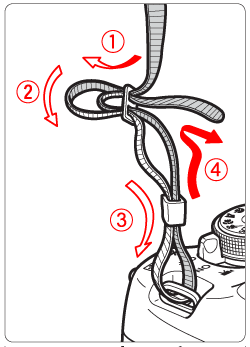
Credit: tw.canon
Frequently Asked Questions
How Do I Know If The Strap Is Attached Correctly?
The strap should lie flat, with both buckles tight and no slipping when gently pulled.
Can I Use Third-party Straps With Canon Cameras?
Yes, most third-party straps fit Canon models, but check the width and mount compatibility.
Should I Remove The Strap When Storing My Camera?
If storing long-term, remove the strap to prevent wear and save space.
What’s The Best Strap For Travel Photography?
A padded shoulder sling offers comfort for extended use and easy access.
Is It Safe To Wash My Camera Strap?
Yes, hand wash with mild soap and air dry. Avoid harsh chemicals or machine drying.
Attaching your Canon camera strap properly ensures safety and comfort. Take a few minutes to check your work, and you’ll enjoy shooting with confidence every time.