There’s no single best video camera for home movie making. There’s a best one for a certain kind of buyer. The right pick depends on how often you’ll film, whether you want to live stream or use it as a webcam, and how much you care about low light and zoom. These camcorders differ on those points, not on any one overall score. Most buyers will be choosing between two options: a simple, easy camera for everyday family moments, and a more feature-heavy model for people who want more control. Start with those two and you’ll narrow things down quickly.
Table of Contents
Picking a Home Movie Camera by Your Situation
If you mostly film yourself for a channel or social posts, the 270-degree flip screen matters more than raw resolution. You can frame your own face while you talk, and that’s the feature that changes how often you actually end up shooting. The VETEK 8K, the ZYDIIE 4K and the CAMWORLD 2.7K all have that screen, so start there before comparing specs.
If you film in dim rooms, at events, or outdoors after dark, look for a built-in fill light or infrared night vision. Several of these models list one or both, and the source describes the night vision as producing black-and-white video in total darkness. That mode is useful for night camping or dim indoor scenes, but the colors are lost, so it suits some situations better than others.
If your footage is mainly for family moments, a stable hand-held or tripod setup matters more than the number of modes. Several listings mention a tripod mount and some include a stabilizer, so check whether the kit you’re considering comes with one or whether you would need to buy it separately.
1. VETEK Full HD 1080P Camcorder

Best for: Families who want one easy camera for birthdays and holidays.
This camera records at up to 1080P and has an 18X digital zoom. That means you can get closer to a child on a stage or a pet in the yard without moving. The infrared night vision is useful for filming indoors after dark, though the footage is black and white. The remote control lets you sit in the frame with the rest of the family while it runs on a tripod, which is handy when nobody wants to be the one behind the lens.
The listing also mentions a pause function, which lets you stop recording without starting a new file. That helps when a scene breaks up and you want to keep everything in one clip. A standard tripod mount sits on the bottom, but the tripod isn’t included, so plan on buying one.
Good if: you want a simple, all-in-one camera for home events; you like using a remote; you film a lot in dim rooms.
Skip it if: you need the highest image detail for large screens.
2. Weochi Video Camera Camcorder HD 4K 48MP Digital Cameras Recorder
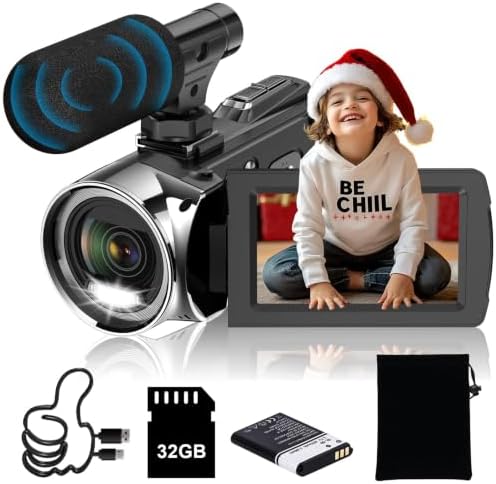
Best for: Someone who wants to record family videos and also stream or video call.
This camera supports 4K video and has a 3-inch screen that rotates. It can act as a webcam when you connect it by USB, which makes it a good match for video calls with relatives who live far away. Set the camera to “Webcam” mode, plug it in, and it can be used for live streaming or video calls on platforms like YouTube, Facebook, or Twitter. That means one device can handle your everyday home recording and your calls without switching gear.
The built-in microphone is an X-Y stereo design meant to capture clear sound and reduce noise. The listing suggests playing recordings back on a computer to hear the best sound quality, so it’s worth checking your footage on a larger speaker before you judge the audio.
The fill light helps with indoor shots, especially in rooms where the light is dim. The camera also comes with a dedicated flash for darker environments, so you have a couple of options when a room is poorly lit.
The time-lapse setting can capture slow events such as a plant growing, a flower blooming, or a sunset. For home projects, this is a nice extra, since it lets you record a process that would take hours and then play it back in a few seconds.
The listing says the camera has a hot shoe mount for an external microphone. If you plan to record speech or music, that’s a useful option, but you’ll need to buy the microphone separately.
The pause function is another everyday feature. You can pause a recording and then resume it without starting a new file, which keeps family footage in one clip rather than a string of small ones.
Good if: you want both home movies and webcam use; you like time-lapse; you want a rotating screen for filming yourself.
Skip it if: you need a lens that focuses on its own at close range.
3. ZYDIIE 4K Video Camera Camcorder UHD 64MP Vlogging Camera

Best for: Someone who films themselves often and wants a clear view of the frame.
The 3-inch touchscreen rotates a full 270 degrees, so you can see yourself while you record. That matters most for solo shots, because you can check your framing as you talk instead of guessing where the lens is pointing. The same rotation helps when you want a high-angle overhead shot or a low-angle view, since you can set the angle and still watch the picture.
The night vision works differently from ordinary low-light color mode. When you press the “OK” button, the camera activates its IR cut filter and switches to high-contrast black and white video. The listing says this gives a clearer image in total darkness than standard low-light color mode, so it’s worth using when the room is dim and you still need to see faces.
The wireless remote lets you start and stop recording, and take photos, from a distance without touching the camera. That’s useful for group shots and for solo creators who want to step back into the frame. Using the remote also avoids the small shake that can come from pressing the record button on the body.
The listing includes two batteries and a 32GB micro SD card, so you can film for longer before needing to swap anything. It also lists face detection, video pause, slow motion, continuous shooting, time-lapse, self-timer, and recording while charging. Those extra modes are there if you want them, but you don’t need to use them to get good footage.
Good if: you film yourself at home; you like a large touchscreen; you want two batteries in the box.
Skip it if: you prefer a simple camera with few settings to learn.
4. Camcorder Video Camera 2.7K 48MP

Best for: A first-time buyer who wants to start filming with no fuss.
This camera records 2.7K video and has a built-in LED fill light for darker rooms. It’s light, weighing about 0.29kg, so it’s easy to hold for long stretches. The flip screen works for selfies, and the pause function lets you stop and resume filming without starting a new file.
Why these features matter for a beginner comes down to what usually goes wrong. Most new filmmakers struggle with poor lighting and with shaky hands, and the fill light and anti-shake stabilization address both problems without requiring any extra gear. The listing says the camera is designed so you can point and shoot, which means you spend your time framing the shot rather than adjusting settings you don’t yet understand.
The lens is fixed-focus, so you need to keep your subject at least 0.6 meters away for sharp shots. That’s a simple habit to learn, and it becomes second nature quickly. Think of it as a rule for where you stand, not a setting you have to change. If you’re filming a close-up of a face, a hand, or a small object, you’ll need to step back a little to keep the image sharp. For wider scenes like a family gathering, a hike, or a stage, you’ll have plenty of room and will rarely notice the limit.
Pause is worth using deliberately. If you stop recording between scenes, you get separate pieces of footage to work with rather than one long, uneven clip, which cuts down the time you spend trimming later. The listing describes this as a way to reduce post-editing time, so it suits anyone who plans to edit their own videos.
The camera can also keep recording while it charges, so a low battery doesn’t have to end a session. That combination makes it a practical choice if you want to start on the same day it arrives.
Good if: you’re new to filming; you want a light camera; you need a built-in light.
Skip it if: you want to connect the camera to a TV with an HDMI cable, since the listing says this model has no HDMI output. In that case, you’ll need to review your footage on the camera’s own screen or on a computer.
5. VETEK Video Camera 8k Camcorder 48MP UHD WiFi Vlogging Camera

Best for: Someone who wants Wi-Fi control from a phone and plans to edit footage.
This camera records at up to 8K and includes Wi-Fi, which lets you connect to a phone app and transfer clips without a cable. To connect, download the app from the manual on your phone, then join the camera’s Wi-Fi network. Once connected, you can browse images, transfer them, and share movies and photos straight from your mobile device. Pressing the “OK” button is how the camera itself confirms your choices.
The noise reduction setting blocks some outside sound when you record. Turn it on before you start filming, and the camera will automatically work to block external noise while you record your own micro-movies. The external microphone input also helps with speech, and it can eliminate and reduce noise during recording. Together these two features are the main reason the camera suits recording yourself talking to the camera.
The HDMI TV output is useful if you want to show family videos on a big screen. Connect the camera to a TV with an HDMI cable and you can play your footage there. Keep in mind that the cable isn’t included.
The tripod and HDMI cable aren’t included, so you’ll need to buy them if you want them. The fill light is a small add-on that sits on the hot shoe mount on top of the camera. The package includes a tri-color fill light with a white flash setting, so you can light your face when recording indoors or in dim rooms.
The camera also supports a pause function, time-lapse, slow motion, continuous shooting, image stabilization, and up to a 256GB SD card. Those extras matter most if you plan to edit footage, since they give you more shot types to cut between.
Good if: you want phone control; you plan to watch footage on a TV; you want an external mic.
Skip it if: you only need basic recording and don’t want to set up an app.
6. FlyFrost 8K Video Camera 88MP UHD WiFi Vlogging Cameras

Best for: A hobbyist who wants a stabilizer and remote in the box.
This camera records at 8K and includes a foldable handheld stabilizer, a lens hood, and a 2.4G remote that works from up to 60 feet.
If you shoot toward a window or in strong sunlight, it’s the accessory you’ll reach for first.
The remote is most useful when you want to be in the frame yourself. Setting the camera on a stand and starting or stopping the recording from across the room lets you walk into a shot without reaching for the body. Its range of 60 feet covers most rooms and open outdoor spaces.
The Wi-Fi app lets you view and share clips from your phone, which saves you from pulling the SD card just to send a clip to someone. The app also lets you control the camera remotely, so you can check framing before you hit record.
The camera supports pause, face detection, slow motion, and time-lapse. Face detection helps keep people in focus when they move around, and time-lapse suits long, slow scenes like a sunset or a busy street. Pause lets you stop and resume within a single clip, which keeps the timeline tidy when you cut a scene in the middle of an action.
The tripod and LED light aren’t included, and the SD card is sold separately. The camera accepts cards up to 256GB, so pick one that fits how much footage you expect to shoot before you head out. If you plan to film in dim rooms, the LED light is worth adding, since the IR night vision produces black and white footage rather than color.
Good if: you walk and film; you want a remote from a distance; you like having a stabilizer ready.
Skip it if: you want everything included, since the SD card and tripod are extra.
7. 5K Video Camera Camcorder 64MP Vlogging Camera

Best for: Someone who wants the most zoom and a full kit in one box.
This camera records 5K video and has a 16X digital zoom with image stabilization. The package includes a 32GB card, two 1800mAh batteries, a tripod, an external noise-reduction microphone, a remote, a lens hood, and a handheld stabilizer.
The zoom is digital, not optical, so it enlarges the image rather than bringing in more detail from the lens. That matters most when you’re filming something far away. The listing says the built-in stabilization keeps footage steady and sharp at that zoom, which is the main reason to choose this model if distant subjects are your priority.
The listing mentions four video modes and four photo modes, including time-lapse, slow motion, and loop recording. The lens is fixed-focus and works best at 0.6 meters or more. In practice, that means you should keep your subject back from the lens rather than filming something held close to it, because the sharpness drops at closer range.
The camera also works as a webcam for live streaming, and the wireless remote lets you start and stop recording from a distance. If you plan to use it that way, the remote is one of the more useful parts of the kit.
The listing also says it isn’t compatible with Mac computers for file recognition and playback. Check this before you buy, since it affects whether you can open your footage on the computer you already own.
Good if: you want a full kit in one box; you film distant subjects; you use a PC.
Skip it if: you use a Mac, as the listing warns against it.
Where These Overlap
Several of these cameras are close in purpose. The VETEK 1080P, CAMWORLD 2.7K, and Weochi 4K are all aimed at simple home filming, and the choice between them often comes down to whether you want a rotating screen, a built-in light, or webcam use. Each of these three lists a 270° rotating screen or a fill light among its features, so start by asking which of those you would actually use every time you film.
The ZYDIIE 4K and VETEK 8K are both strong for solo vlogging, since both offer a touchscreen that rotates 270 degrees and a wireless remote for starting and stopping recording. The 8K model adds Wi-Fi control through a phone app and HDMI TV output, which matters if you plan to review footage on a larger screen or control the camera from across the room.
The FlyFrost 8K and Flemikie 5K both come with a stabilizer and a remote, so the decision there usually depends on whether you need the higher resolution or the larger bundle. The Flemikie includes a tripod, an external microphone, a lens hood, and a spare power pack in its kit, while the FlyFrost lists its extras as optional or separate in several places. Compare the included items against what you would otherwise buy yourself.
Keep in mind that the webcam feature appears on almost every model here, so it rarely separates two cameras on its own. If two listings look the same to you, check which accessories you need, such as an external microphone, an SD card, a tripod, or a light. Those extras are usually the first thing you’ll miss after the first week of use, and they’re what separates these cameras in daily use.
Still Not Sure?
Will I really use it often?
If you only film a few events a year, a simple camera like the VETEK 1080P or CAMWORLD 2.7K will serve you well. These models have fewer settings to learn, and they’re easy to pick up after a long break. If you plan to film every week or start a regular project, a model with a rotating screen and a remote, such as the ZYDIIE 4K, will make daily use more comfortable.
What do I already own?
Think about the gear you have. If you already have a tripod, the VETEK 1080P and the ZYDIIE 4K will work without extra purchases, since the tripod mount is standard. If you have a TV and want to show clips on it, the VETEK 8K is the one with an HDMI output. If you have a Mac, skip the Flemikie 5K, because the listing says it doesn’t work well with Mac computers.
What am I most likely to regret?
Most people regret buying too much or too little. Buying the 8K models for simple family events is more than many people need, so the Weochi 4K or CAMWORLD 2.7K may be a better fit. On the other hand, buying a basic camera and then wishing you had a stabilizer is a common regret. In that case, the FlyFrost 8K’s included stabilizer and remote may save you a second purchase.
Frequently Asked Questions
Can I use a home movie camera as a webcam?
Several models here support webcam mode, including the Weochi 4K, ZYDIIE 4K, and Flemikie 5K. You connect the camera to a computer with the included USB cable and select the webcam option in your video software. The setup steps differ a little between models, so read the manual for the camera you choose.
Do I need a tripod or memory card for these cameras?
It depends on the model. The VETEK 1080P, CAMWORLD 2.7K, and VETEK 8K all need you to buy a tripod separately, because the listings say it isn’t included. The ZYDIIE 4K and Flemikie 5K include a memory card, while several others, such as the FlyFrost 8K and Weochi 4K, do not. Check the package contents on the listing before you order so you don’t run short.
Do these cameras work well in dark rooms?
Most of them include some form of night vision or a fill light. The VETEK 1080P and FlyFrost 8K offer infrared night vision that produces black and white footage. The CAMWORLD 2.7K has a built-in LED fill light for color shots in dim rooms. Keep in mind that night vision footage is black and white, so think about whether you want color or contrast before choosing.
Do these cameras need to be kept a set distance from the subject?
Some do. The CAMWORLD 2.7K and Flemikie 5K have fixed-focus lenses, and their listings say the best sharpness comes at about 0.6 meters or more. The other models here list autofocus or don’t state a limit, so the listing is the best place to check. If you film close-ups often, that single detail may decide your choice.
Closing
Two situations split most buyers. The first is the family who wants one easy camera for birthdays and holidays. For them, the VETEK Full HD 1080P Camcorder is a straightforward choice. It records at up to 1080P, has a remote control for shooting from a tripod, and can be carried around without much fuss.
The second is the solo creator who films themselves often. For that person, the ZYDIIE 4K Vlogging Camera fits well. Its 3-inch touchscreen rotates 270 degrees, so you can frame your own shot without guessing, and its wireless remote starts and stops recording from a distance.
Think about how often you’ll actually use the camera. If you only film a few times a year, a simpler model with fewer features is less to learn and less to lose. If you plan to film every week, the rotating screen and remote are worth having, because they save you the most effort on repeated shoots.
Decide which situation sounds like you, then check the current listing for the features you care about most. Specs such as zoom, night vision, and webcam mode vary between models, so confirm them on the listing before you buy.