Many camera users get surprised when they see Exp Sim flashing on their camera’s screen. You may wonder if something is wrong, or if you need to repair your camera. Don’t worry—this warning is common on DSLR and mirrorless cameras, especially on Canon models. Understanding why it appears can help you fix your exposure and take better photos.
Table of Contents
What Does Exp Sim Mean?
Exp Sim stands for Exposure Simulation. When this feature is active, your camera tries to show what your final picture will look like, based on your settings like ISO, aperture, and shutter speed. If the camera thinks your photo will be too dark or too bright, it flashes “Exp Sim” as a warning.
Here’s a simple table showing when Exp Sim might flash:
| Camera Setting | Exp Sim Flashes? | Reason |
|---|---|---|
| Manual Mode, Low Light | Yes | Image likely underexposed |
| Manual Mode, High Light | Yes | Image likely overexposed |
| Auto or Program Mode | No | Camera adjusts settings |
Why Is Exp Sim Flashing?
Exp Sim usually flashes for these reasons:
- Manual mode: You set the camera to M (manual) and your settings don’t match the current light.
- Live View: You use the LCD screen to compose, and the camera warns you about possible exposure problems.
- ND Filters: Using strong ND filters (to block light for video or long exposures) can confuse the meter, causing the warning.
- External Flash: If you use a non-camera-brand flash, the camera may not “see” the flash and shows Exp Sim.
Some beginners overlook that Exp Sim is just a simulation. The camera can’t know if you plan to use extra lights or brighten the image later. If you use a flash, the warning may not matter.
Credit: www.reddit.com
How To Fix Exp Sim Flashing
Try these solutions if you see Exp Sim flashing:
- Increase ISO for brighter images.
- Open the aperture (lower f-number).
- Slow down the shutter speed.
- Remove or reduce ND filters if not needed.
- Switch to Auto mode if unsure.
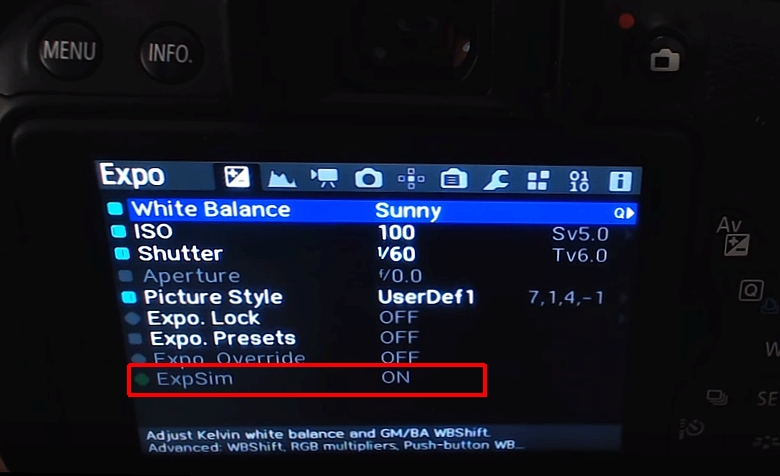
- If using flash, ignore the warning, or turn off Exp Sim in menu.
Here’s a quick comparison of exposure settings:
| Setting | Bright Image | Dark Image |
|---|---|---|
| ISO | Higher (e.g. 1600) | Lower (e.g. 100) |
| Aperture | Wider (f/2.8) | Narrower (f/16) |
| Shutter Speed | Slower (1/30s) | Faster (1/1000s) |
When You Can Ignore Exp Sim Flashing
If you plan to use a flash or studio lights, Exp Sim may flash because the camera doesn’t know about your extra light sources. In these cases, you can safely ignore the warning as long as you know your lights will brighten the scene.
Credit: community.usa.canon.com
Frequently Asked Questions
Why Does Exp Sim Flash Only In Manual Mode?
Because in manual mode, you control all exposure settings. The camera can’t adjust for you, so it warns you about possible exposure problems.
Will Exp Sim Flashing Affect My Photo?
No, it’s just a warning. Your photo will turn out as your settings dictate, not because of the Exp Sim message.
Can I Turn Off Exp Sim?
Yes, most cameras let you disable Exposure Simulation in the settings menu. Check your camera’s manual or the Canon support page.
Should I Trust Exp Sim When Using Flash?
Not always. The camera can’t predict how much the flash will brighten your photo.
Is Exp Sim The Same As Exposure Compensation?
No. Exp Sim is a warning, while exposure compensation adjusts brightness in auto modes.
Understanding Exp Sim helps you trust your skills and get the photos you want. It’s a tool, not a problem!