Cameras are powerful tools, but camera filters can take your photography to the next level. Whether you use a DSLR, mirrorless, or even a smartphone, experimenting with different filters can create unique effects and solve tricky lighting problems. Here are some creative ideas to inspire your next shoot and help you choose the right filter for your style.
Table of Contents
Popular Camera Filter Ideas
Camera filters come in many types. Each has its own purpose, from fixing color to adding drama. Let’s look at some of the most popular options:
- Polarizing filters: These reduce reflections from water, glass, and shiny surfaces. They also make skies look deeper blue and boost color contrast.
- Neutral Density (ND) filters: ND filters cut the amount of light entering the lens. This lets you use slow shutter speeds in bright light, perfect for silky waterfalls or blurred city crowds.
- Graduated ND filters: These are darker at the top and clear at the bottom. Use them for landscapes where you want to balance a bright sky with a darker foreground.
- UV filters: While they once protected film from UV rays, today they’re mostly used to protect your lens from dust and scratches.
- Color filters: These give your images a special mood. Try a warm orange filter for sunset shots, or a cool blue for winter scenes.
- Infrared filters: These block visible light and let only infrared through, creating surreal photos with white foliage and dark skies.
- Soft focus filters: Perfect for portraits, these soften skin and give a dreamy look.
Here’s a quick comparison of three popular filter types:
| Filter Type | Main Benefit | Best Use Case |
|---|---|---|
| Polarizer | Reduces glare, boosts colors | Landscapes, water, sky |
| ND Filter | Allows longer exposures | Waterfalls, motion blur |
| UV Filter | Lens protection | Everyday shooting |
Creative Filter Techniques
You don’t need to spend a lot to get creative. Try these ideas:
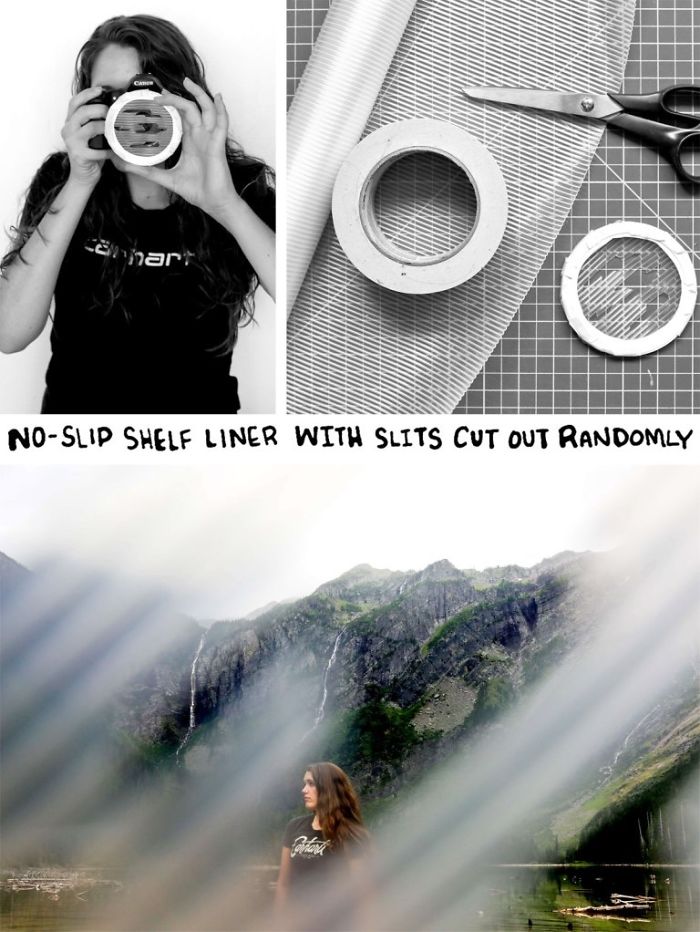
- DIY Filters: Stretch a piece of colored plastic or cellophane over your lens for instant color effects.
- Vaseline Trick: Smear a little Vaseline on a UV filter for a soft, dreamy look (never put Vaseline directly on your lens).
- Prism or Glass: Hold a small glass prism or crystal in front of your lens to create rainbow flares and light leaks.
Some photographers even use objects like lace or mesh to make interesting patterns with light. Just remember to clean your filters regularly, as dirty filters can ruin image quality.
Credit: zorgenondersteuning.com
Choosing The Right Filter
Pick a filter based on your subject and lighting. For landscapes, a polarizer or graduated ND often works best. For creative portraits, try a soft focus or colored filter. If you’re unsure, start with a UV filter for lens protection, then add others as you grow.
This table helps you choose:
| Subject | Recommended Filter | Effect |
|---|---|---|
| Portraits | Soft Focus | Smooth skin, dreamy look |
| Cityscapes | ND Filter | Motion blur, light trails |
| Nature | Polarizer | Vivid colors, less glare |
Experimentation is key. Many amazing effects happen by accident, so don’t be afraid to try new things.
Camera filters open up a world of creative options. With the right filter, even a simple scene can become something special. For more detailed information on filter types and their history, check out Wikipedia.
Frequently Asked Questions
What Is The Main Purpose Of A Camera Filter?
A camera filter changes the light entering your lens, creating effects or solving lighting problems.
Can I Use Filters On A Smartphone Camera?
Yes, there are clip-on and app-based filters for smartphones that give similar effects.
Do Filters Reduce Image Quality?
A high-quality filter will not harm image quality, but cheap or dirty filters can cause blur or color loss.
How Do I Clean My Filters?
Use a soft lens cloth and special cleaning solution. Do not use rough materials.
Is A Uv Filter Necessary For Digital Cameras?
Digital sensors are not sensitive to UV light, so a UV filter is mainly for protecting your lens.
Credit: www.boredpanda.com