There’s no single best stabilizer for a GoPro. There’s a best one for a certain kind of buyer, with a certain habit and a certain set of demands. Most people decide on three things: how much they will carry, whether they need the camera to follow a person on its own, and whether they want the stabilizer to control the camera or just hold it steady. These seven picks differ on exactly those points, so the list is less a ranking than a map. Two products split most buyers: the GoPro Fluid Pro AI for people who want automatic tracking and a camera-first setup, and the DJI RS 3 Mini for people who want something small and simple to carry all day.
Table of Contents
1. GoPro Fluid Pro AI 3-Axis Gimbal Stabilizer

Best for: Solo creators who want the camera to follow them on their own.
The main reason to look at this one is the AI subject tracker. The listing says it locks onto a person’s face or body and follows them through the frame, and it can be mounted forward or rear facing. That changes how you shoot when you’re alone. You can walk, talk and gesture without needing a second person to hold the camera on you. Forward facing is the natural choice when you’re narrating to the lens, while rear facing lets you film the scene in front of you and still keep yourself in the frame.
The tracker works on a person, so it’s best suited to shots where you’re the subject. If you want the camera to follow a pet, a vehicle or an object, this module isn’t described as doing that, and you shouldn’t count on it.
The kit is large. It includes a gimbal, a phone bracket, a GoPro bracket, a finger adapter, a tripod base and a zippered case. The listing also says the fill light helps balance the light in your shot. Those extras mean you have less to buy separately, though you’ll still want to check that your exact camera model fits the included brackets.
Compatibility is the detail to confirm before you buy. The listing names the GoPro models that support Bluetooth control: the HERO9 Black, HERO10 Black, HERO11 Black, HERO12 Black and HERO13 Black. Phones and select compact point-and-shoot cameras are also listed as working with the kit. If you own an older GoPro outside that list, you can still mount it, but you lose the wireless camera control the listing highlights.
Good if:
- You film vlogs or tutorials alone and want hands-free tracking.
- You switch between a GoPro and a phone and want one kit for both.
- You like having the fill light built in.
Skip it if:
- You mostly film other people who are already in a steady position.
- You want the lightest possible rig to carry on long hikes.
2. DJI RS 3 Mini
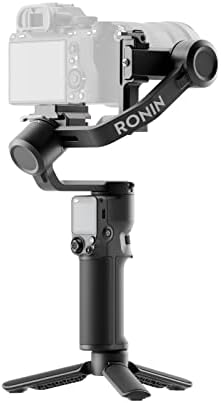
Best for: Travelers who want a small, light stabilizer for a whole day of walking.
At 795g it is light enough to hold for extended shooting, per the listing. The weight also matters because the gimbal is rated for a payload of up to 2 kg (4.4 lbs), so you can carry a fairly wide range of camera and lens combinations without needing a heavier rig. Check your own camera and lens weight against that limit before you buy.
The gimbal also has a native vertical shooting arm. You mount the quick-release plate to that arm, and you’re set for phone-style social media video without tilting the whole rig. That’s the feature to lean on if most of your footage is vertical.
Bluetooth shutter control is listed, and the camera reconnects automatically after the first pairing. Once that’s done, you can start and stop recording or take photos from the gimbal itself, which saves you from reaching for the camera body while you’re moving. The touchscreen is 1.4 inches. It shows a new interface, and the frequently used settings sit where you can reach them quickly.
The listing also notes that DJI Ronin gimbals need the DJI Ronin app for activation, and that the app has been removed from Google Play. You must download it from DJI’s official website instead. Do this setup before your trip, not on the morning you need to shoot, so you know the gimbal works with your camera.
Good if:
- You carry your gear on foot or on trips and weight matters.
- You shoot for vertical social video often.
- You want to control the camera from the gimbal.
Skip it if:
- You aren’t comfortable with an app-based setup step.
- You need the camera to track a person automatically.
3. Hohem iSteady 5.0

Best for: Action sports fans who want a simple clip-in stabilizer for a GoPro.
This one is built around fast mounting. The listing describes a quick-release clip that lets you mount and unmount the camera in one step. That matters most when you’re switching between shots during an outing, because you can get the camera on the gimbal without fiddling with the mount each time. The gimbal is meant for running, riding, skating and similar movement, and the listing says the 3-axis design keeps footage steady even when the action is rough.
The app works like a remote control for the stabilizer. You can adjust its settings, change the motor direction, or pick a mode such as time-lapse. The app is the place to set up the gimbal before you head out, so it helps to load it on your phone and try the modes at home first.
The listing gives an IPX4 rating, which means the motor is protected from water splashes from any direction. That’s a splash rating, not full waterproofing. It covers rain, spray and wet hands, but it doesn’t mean you should submerge the gimbal. The listing also gives a 3600mAh battery that supports up to 14 hours of continuous shooting, which is useful for long time-lapse sessions. A Bluetooth module lets you start and stop recording with one click. One limit is clear in the listing: the GoPro Hero 7 White and Silver models don’t support Bluetooth pairing with this gimbal, so on those models you lose the one-click control.
The gimbal’s size and weight limits are worth checking against your camera. It supports a load of up to 0.33 lbs, and the listing gives a maximum height under 2 inches and a maximum thickness under 1.18 inches. A 3 1/4″ screw hole on the bottom takes other GoPro accessories such as tripods or video lights, so you can use the same mounts you already have.
Good if:
- You film while moving and need to swap the camera in and out quickly.
- You shoot near water and want splash resistance.
- You want a long battery for time-lapse work.
Skip it if:
- You own a Hero 7 White or Silver and want remote start and stop.
- You need a camera that isn’t a GoPro, Osmo or Insta360, since the listing lists a limited set.
- You plan to use an Osmo Action or Insta360 ONE R and expect full control: for those cameras the gimbal provides video stabilization only and can’t take photos or start and stop recording.
4. FeiyuTech SCORP Mini-3-Pro Camera Gimbal with AI Tracking

Best for: Creators who use a phone, a GoPro and a mirrorless camera with one stabilizer.
The main point of this model is range. The listing says it supports mirrorless cameras, compact cameras, GoPro and phones, with a payload of 2 kg (4.4 lbs). That’s more than most of the others on this list can carry, so it suits heavier camera setups.
If you switch between devices during a shoot, that range matters. A single gimbal that takes a mirrorless body with a lens, a GoPro and a phone saves you from buying and carrying three separate stabilizers. Check your heaviest setup against the 4.4 lb figure before you buy, including the lens and any accessories you mount on top.
It also has built-in AI tracking that works without an app or external sensor, with gesture controls to start tracking, take photos or record. The listing gives a tracking distance of up to 18 meters and a response time of 0.003 seconds. Gesture control is most useful when you’re the only person on set, because you can start a shot without reaching for the gimbal or a phone.
The detachable remote handle works as a wireless remote for distance and low-angle shots, and it lets you switch between horizontal and vertical shooting. Vertical mode is the feature to look at if you post to short-form video platforms. You can change orientation without rebuilding the rig.
It’s a bigger, heavier rig than the compact options, and you should expect that weight when you carry it. The gimbal is built for the range of devices it supports, so it isn’t the choice if you only ever film with a small camera and want to keep the kit light.
Good if:
- You need to carry a heavier camera or lens.
- You want gesture control and tracking without an app.
- You film for both phone and camera work.
Skip it if:
- You want the smallest rig you can slip into a bag.
5. AFUNTA Pro Handheld Video DSLR Camera Stabilizer Steady Compatible GoPro

Best for: Beginners who want a basic handheld stabilizer with no electronics.
This is a manual stabilizer, not a motorized gimbal. The listing gives a maximum load of 2.1 lbs, which covers a GoPro and a small phone clip, and it uses a standard 1/4 screw to fit most cameras. Balance is set by hand: the listing says a red nut adjusts the weight up or down, and the handle is used to fine-tune the setup.
The listing also says that a slight shake in the handle is normal while it’s being fine-tuned. That’s worth knowing before you buy, because a manual rig depends on your balance and your hands. Expect to spend some time adjusting it before the footage steadies. There are no batteries, no app and no Bluetooth, so it’s simple to learn and simple to keep running.
Compatibility depends on the mount. Any camera or phone clip with a 1/4 screw hole can attach, which is what makes it work with several brands. If your device has no such hole, you’ll need an adapter, and the listing doesn’t say what adapters to use.
Good if:
- You’re new to stabilizers and want something with no setup.
- You don’t want batteries or an app to manage.
- You’re shooting light cameras and phones.
Skip it if:
- You want automatic stabilization or tracking.
- You plan to carry a heavy camera.
6. Wondalu S40 15.8’/40CM Handheld Steadycam Camera Stabilizer

Best for: Filmmakers who want a long arm to reach low and high angles.
The main feature here is reach. The listing says the stabilizer extends from 11.6 inches to 15.8 inches, which lets you shoot from much lower or higher than a short rig allows. That extra distance matters most when you want to get the camera close to the ground, near a subject’s waist, or above a crowd, without moving your whole body into an awkward position.
Reach also changes how the rig behaves. The listing doesn’t give specifics on how the extension affects stability, so treat the length as a tradeoff you’ll have to test yourself. A longer arm gives you more range, but it also gives small hand movements more leverage over the frame.
The rig has six removable weights, so you can tune the balance to the camera you’re using. Start by mounting your camera and checking whether the rig sits level on its own. If it tips, add or move weights until it settles. Do this at the length you plan to shoot at, because the balance you set at the shortest extension may not hold when you pull the arm out.
The frame is aluminum with a black powder coating. The listing gives no further details about the coating or the metal grade, so judge its durability for yourself rather than relying on claims.
The listing says it supports GoPro and other action cameras weighing 1.1 to 3.3 lbs. It also mentions quick-release plates with two common screw sizes, so you can add other mounts later. Check the screw size on your camera or accessory before buying anything extra, since the two sizes aren’t interchangeable.
Expect a learning period. Practice walking slowly and keeping the frame steady before you try to film anything important with it.
The extra length also makes it bulkier to carry than a compact gimbal. If you tend to carry your gear over long distances, plan for the extra bulk in your bag.
Good if:
- You want to film from very low or very high angles.
- You like to tune balance with removable weights.
- You already own other mounts with standard screw sizes.
Skip it if:
- You need something small enough for a backpack pocket.
7. Zeadio Video Action Stabilizing Handle Grip Handheld Stabilizer with Cold-Shoe

Best for: Buyers who want the lightest, simplest grip for everyday action filming.
The listing describes a cushioned, padded handle that reduces hand strain on long shoots. The padding matters most when you hold the rig for a long stretch, because a plain handle can start to ache well before the battery or the memory card runs out.
It works with cameras that use the standard thread, so it fits a GoPro with an adapter, and it has a cold-shoe mount for other accessories. The cold shoe is useful if you want to add a small light or a microphone without giving up the grip.
The listing points to skateboarding, biking, snowboarding, surfing and similar sports as the main use. It’s a manual grip, so the steadiness depends on how you move and hold it. Keep your elbows tucked and move your body rather than your wrists, since that’s what keeps the footage from jerking.
The listing doesn’t give a payload limit or a size, so check the specs against your camera before buying. Weigh your camera with its battery and lens, then compare that number with what you expect the grip to handle.
Good if:
- You want the lightest rig with a comfortable grip.
- You film sports and want a simple handle.
- You want a cold-shoe mount for extra accessories.
Skip it if:
- You need a motorized gimbal for smooth footage.
- You need a stated weight limit for a heavier camera.
Where These Overlap
The DJI RS 3 Mini and the Hohem iSteady 5.0 are both compact, GoPro-friendly gimbals, and for a casual shooter the choice may barely matter. Both are small, both have Bluetooth control and both suit moving shots. The deciding factor is the setup. The DJI needs its companion app downloaded from DJI’s official website, because it isn’t listed on Google Play, so plan a few minutes for that before your first shoot. The Hohem uses a quick-release clip that mounts and unmounts the camera in one step, which is simpler if you swap cameras often.
Check the model before you buy the Hohem. Its listing notes that the GoPro Hero 7 White and Silver don’t support Bluetooth pairing with this gimbal. Stabilization still works on those cameras, but you would lose the one-click start and stop, so if that feature matters to you, confirm your camera’s model first.
The AFUNTA and the Zeadio are also close. Both are manual grips with no electronics, and both suit light cameras. They differ mainly in feel. The AFUNTA has a balance system you adjust by hand: you move the counterweight and fine-tune the handheld portion until the camera sits level, which takes a little patience but rewards it. The Zeadio is built around a padded handle, which matters most when a session runs long and your hand starts to tire. If you want to tune balance, pick the AFUNTA. If comfort during long sessions matters most, pick the Zeadio.
The GoPro Fluid Pro AI and the FeiyuTech SCORP stand apart. Both offer tracking and remote control, but they’re built for different shooters. The FeiyuTech carries a heavier payload and works with more camera types, including mirrorless cameras and phones, so it suits someone who may change gear. The GoPro kit is built more tightly around GoPro and phone use, which makes sense if that’s the only setup you plan to run.
Still Not Sure?
How often will I really use it?
If you shoot every week, a motorized gimbal with tracking earns its place. The GoPro Fluid Pro AI and the FeiyuTech SCORP handle daily use with long battery life and built-in controls. Battery life is the first thing to check, since the SCORP lists up to 14 hours and the Hohem lists 14 hours of continuous shooting as well.
If you only shoot a few times a year, a manual grip like the Zeadio or AFUNTA is simple to carry and needs no setup. There are no batteries to charge and no app to set up, so you can pick it up and start filming. You can always upgrade later once you know how much you actually use it.
Think about where you’ll shoot, too. Motorized rigs add weight and bulk, which matters on a long walk or a hike. A simple grip is easier to tuck into a bag and carry without thinking about it.
What do I already own that this has to work with?
Check your camera model first, because compatibility is the detail that most often leads to a return. The Hohem lists GoPro 5 through 13 and some other action cameras, but its Bluetooth feature doesn’t work with the Hero 7 White or Silver. If you have one of those, you can still use the stabilizing, but you’ll need to operate it by hand.
The GoPro Fluid Pro AI includes brackets for both GoPro cameras and phones, so it suits someone who switches between the two. The DJI RS 3 Mini supports a 2 kg (4.4 lb) payload, which covers many mirrorless setups. If you already have standard mounts, the Wondalu S40 and the SmallRig clamp give you room to add lights or a microphone later.
Start with the camera you own and work outward. A rig that fits your current camera and accessories will serve you better than one chosen for features you may never use.
What am I most likely to regret choosing?
Most people regret a rig that’s too small for their camera or too heavy to carry. If you plan to film with a larger camera or a heavier lens, the FeiyuTech SCORP’s 2 kg payload is the safer pick, because it leaves room for the setup you may add later. A rig that’s near its limit will feel unsteady and strain the motors.
If you carry gear all day, the DJI RS 3 Mini’s light weight is easier on your arm than heavier options. Weight matters more over a long shoot than it does in a store.
Think about the bag you’ll carry and the camera you’ll mount before you choose. Hold the rig for a few minutes in your hand if you can. A stabilizer you dread carrying will sit at home, no matter how good its footage is.
Frequently Asked Questions
Do I need a motorized gimbal, or will a manual stabilizer do?
It depends on the shots you want. A motorized gimbal keeps the camera level as you move, which helps most when you walk or run. A manual stabilizer like the AFUNTA or Zeadio needs practice and steady hands, and it has no batteries to charge. If you’re a beginner, start with a manual grip and move to a gimbal once you know what you need.
Which stabilizers work with an older GoPro model?
The Hohem iSteady 5.0 has a clear limit: the GoPro Hero 7 White and Silver models don’t support Bluetooth pairing with it. The listing states this directly, so check your model before buying if you want remote control. Most of the other picks are listed for newer GoPro models, and some are listed for standard 1/4 screw mounts that work across many cameras.
Can a stabilizer track a person on its own?
Yes, but only some of these models have that feature. The GoPro Fluid Pro AI and the FeiyuTech SCORP both list AI tracking that locks onto a person’s face or body. The other picks are manual or use Bluetooth control, so the camera won’t follow someone without you guiding it. If automatic tracking is important, check that feature first.
How do I set up a DJI RS 3 Mini?
The listing says DJI Ronin gimbals need the DJI Ronin app for activation and full functionality, including firmware updates. The app has been removed from Google Play, so you should log in to DJI’s official website and download the latest version there. Plan for that step before your first shoot. Once set up, the listing says the camera reconnects after the first Bluetooth pairing.
Conclusion
Before you buy, take a minute to match the list to your own habits. Ask how far you’ll carry the rig, whether you want it to follow you, and whether you’d rather fiddle with settings or just press record. If you’re still torn between the two main options, rent each one for a weekend and shoot the same walk twice. You’ll know your answer quickly, and you won’t have to guess.