The ZHIYUN CINEPEER Smooth 5E Combo Gimbal is a specialized tool designed to stabilize smartphones during video recording, helping users achieve steady, professional-looking footage. It features a structure the manufacturer calls an “orthogonal three-axis” design, which aims to provide more room for movement, along with powerful motor drives and stabilization algorithms. The device supports five distinct gimbal modes, including pan-follow, lock, full-follow, POV, and V mode, to accommodate various filming styles.
This stabilizer is built for people who frequently capture video, such as vloggers, live-streamers, vacationers, and filmmakers looking to improve their content quality. It integrates with dedicated mobile software to offer features like subject tracking, gesture recognition, and remote control. One primary trade-off that a potential owner will need to consider is that while the device offers advanced tracking and lighting options, it relies heavily on specific app compatibility and hardware ecosystem requirements to unlock its full range of remote capabilities.
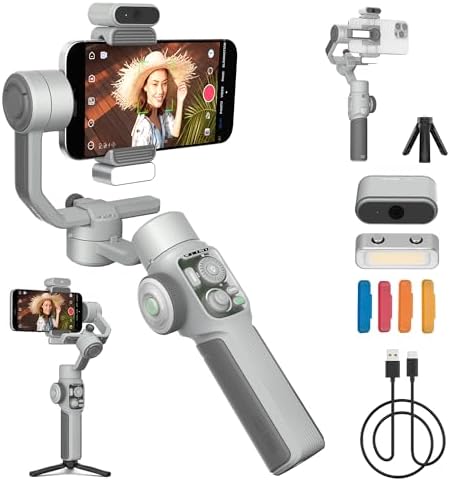
Table of Contents
Who Should Use the Smooth 5E Combo Gimbal
This stabilizer is a strong candidate for content creators who need reliable, steady footage while moving. It suits vloggers and YouTubers who often film themselves or their surroundings and require a simple way to track a subject without manually adjusting the camera.
If you are a solo creator who needs to start or stop recording from a distance, the gesture recognition function allows you to trigger actions simply by showing a “yeah” gesture or a palm. It is also well-suited for users who want to add extra light to their scenes, as the gimbal includes a built-in fill light and magnetic attachment points for additional illumination.
Filmmakers and vacationers will find the orthogonal three-axis design particularly useful. Because this structure provides a larger shooting space, it allows for more fluid movement when capturing complex angles. If you are filming a dancer, a pet, or a large crowd, you can use the ZY Cami app to lock onto your subject with a single tap. This ensures the protagonist stays in frame even during unpredictable movement.
It is also an effective choice for those already invested in the Apple ecosystem. Owners of compatible Apple Watch models can use their watch as a remote assistant to monitor scenes, zoom, and control tracking. This is vital for creators working alone who need to check their framing from in front of the lens.
However, users who prefer not to use specific mobile apps for every shot might want to look elsewhere. While the gimbal offers some functionality through a magnetic AI tracking module for native camera apps, the most advanced editing and guidance features are tied to the manufacturer’s software.
Furthermore, those who own devices that fall outside the specified iOS or watchOS requirements will find that certain features, like the Apple Watch integration, are not available. If your priority is a “plug-and-play” experience without any software setup, you should look for a device that functions entirely as a mechanical stabilizer without relying on app-based tracking or ecosystem-specific remote controls.
Capabilities and Creative Control
The Smooth 5E Combo Gimbal provides a comprehensive suite of tools to assist in creating stable, high-quality video content by managing the physical movement of your smartphone.
Mechanical Stabilization and Movement
The core of the device is its cinema-grade gimbal structure, which uses a custom orthogonal three-axis design to increase the available shooting space. By utilizing powerful motor drives and specialized stabilization algorithms, the device works to keep your phone level and steady even when you are walking or moving the camera. The five gimbal modes—pan-follow, lock, full-follow, POV, and V mode—allow you to choose how the camera reacts to your movements. These modes are designed to ensure smooth transitions and consistent framing, whether you are panning across a landscape or tracking a moving subject. The listing specifies that the gimbal can support a payload of 300g, which is a key limit to keep in mind when attaching larger phones or cases.
Integrated Lighting Solutions
To help maintain high image quality in various environments, the gimbal comes equipped with both a built-in fill light on the arm and an additional magnetic fill light. The system is designed with an integrated magnetic power setup that supports up to two more magnetic fill lights, which are available for separate purchase. This modular approach allows users to double their brightness when shooting in darker conditions. The manufacturer emphasizes that these lighting options provide confidence during shoots by ensuring the subject is properly lit, regardless of the ambient light level.
Smart Tracking and Gesture Control
The device leverages the ZY Cami App to offer precise tracking capabilities. You can frame a subject—such as a pet, figurine, or person—with one finger to initiate locked tracking. For more complex scenes involving crowds, the rear trigger button allows for one-click activation of face recognition and smart tracking. Beyond app-based tools, the magnetic AI tracking module allows for tracking in native camera apps, beauty apps, and short-video apps. Gesture recognition provides a hands-free way to manage your workflow, letting you start recording or tracking with simple hand signals. The listing doesn’t mention whether the gimbal supports non-magnetic mounting for third-party accessories.
Ecosystem Integration and Software
For professional-level creation, the device connects to the ZY Cami and StaCam apps. These apps provide step-by-step guidance, intelligent production, and editing tools to help save time during post-production. Apple users can further enhance their workflow by connecting the gimbal to an Apple Watch, which serves as a remote control for monitoring, zooming, and tracking. This integration requires iOS 16.0 or later and is compatible with specific Apple Watch models, including the Ultra and Series 7, 8, and 9, with a minimum watchOS version of 9.0. You can review the ZHIYUN official support page for more details on compatibility and firmware updates.
| # | What Amazon lists |
|---|---|
| 1 | [Orthogonal Three-Axis] The ZHIYUN CINEPEER SMOOTH 5E Combo phone gimbal features a cinema-grade gimbal structure with a custom “orthogonal three-axis” design, providing a larger shooting space. Phone stabilizer for video recording is equipped with powerful motor drives and ZHIYUN’s stabilization algorithms, offering five gimbal modes (pan-follow mode, lock mode, full-follow mode, POV mode, and V mode) to ensure smooth and stable filming. |
| 2 | [Built-in & Magnetic, Multi-Light Fill] The SMOOTH 5E COMBO gimbal stabilizer for smartphone version features a built-in fill light in the gimbal arm, along with an additional magnetic fill light. The iphone gimbal uses an integrated magnetic power system that allows for the use of up to two more magnetic fill lights (available for separate purchase), effectively doubling the brightness to ensure confidence in your shooting. |
| 3 | [Everything Follows, Precise Tracking] In the ZY Cami App’s video shooting interface, simply frame your pet, figurine, dancer, or large crowd with one finger to achieve locked tracking. Within the app, you can quickly activate face recognition and smart tracking by pressing the rear trigger button on the SMOOTH 5E phone gimbal stabilizer, allowing you to lock onto the main subject with just one click. |
| 4 | [Gesture Recognition Control] ZY Cami App has built-in gesture recognition function. You only need to make a “yeah” gesture to start recording, and stretch out your palm to complete the shooting. You can shoot wherever you go and easily lock the protagonist of the video. The CINEPEER SMOOTH 5E is a professional 3-axis smartphone stabilizer ideal for vloggers, live-streamers, vacationers and filmmakers who want to create smooth and steady content. (Gesture control: follow + shoot, only shoot, only follow) |
| 5 | [Remote recognition, AI Tracking] AI tracking phone gimbal stabilizer without using the ZY Cami App, you can use the magnetic Ai tracking module to quickly lock and follow people in the phone’s native camera, beauty apps, short video apps and other shooting apps. You can use different gestures to start tracking, composing and video recording remotely. |
| 6 | [Remote control] The 5E Combo phone video stabilizer With support for Apple ecosystem integration, simply download and connect to the ZY Cami App to turn your Apple Watch into a remote shooting assistant, allowing you to control tracking, zoom, and monitor the scene all from your wrist. (*Compatible with Apple Watch Series 7/8/9, Apple Watch SE 2, Apple Watch Ultra 1/2, with a minimum watchOS version of 9.0. iPhone requires iOS 16.0 or later.) |
| 7 | [Smart Production, Professional Creation] The cell phone gimbal stabilizer features powerful ZY Cami and StaCam apps provide step-by-step guidance for filming, intelligent video production, and editing, offering you more creative ideas for your shoots. Make your photos and videos more professional and creative, allowing you to shoot and edit like a pro while saving you time. |
Pros and Cons
Pros
- Includes built-in and magnetic fill lights for illumination
- Supports 300g payload for various smartphone models
- Offers five distinct gimbal modes for flexible filming
- Features gesture control for hands-free recording and tracking
- Provides Apple Watch integration for remote monitoring
Cons
- Advanced features require ZY Cami or StaCam apps
- Apple Watch integration has specific iOS and watchOS requirements
- Extra magnetic fill lights require separate purchase
The Verdict
The ZHIYUN CINEPEER Smooth 5E Combo Gimbal is an excellent choice for creators who want to elevate their production value through stable, automated motion. You should buy it if you are a vlogger or social media creator who uses a smartphone for regular content production and wants the benefit of AI tracking and remote control. It is particularly valuable for solo filmmakers who need to manage their own framing and lighting without an assistant.
The orthogonal multi-directional design provides a larger shooting space compared to traditional stabilizers. This structural advantage, combined with powerful motor drives, ensures that your footage remains smooth across a wide variety of versatile gimbal modes. By integrating both a built-in fill light and magnetic lighting options, the device solves common exposure challenges for mobile shooters who lack professional studio gear.
If you are an Apple user, the integration with the Apple Watch makes this a convenient tool for remote operation. You can control tracking, zoom, and scene monitoring directly from your wrist. However, if you work primarily with older mobile devices or prefer to avoid proprietary apps, you might find the reliance on the ZY Cami ecosystem to be a hindrance. In such cases, look for a simpler, mechanical-only stabilizer that does not depend on software-driven tracking to function.
The main trade-off is the balance between the convenience of high-end features and the requirement for specific software compatibility. While the hardware itself is robust, the total experience is tied to your phone’s operating system and the apps you are willing to use. For those who meet the software requirements, the optional magnetic AI tracking module allows you to lock onto subjects even outside of the ZY Cami app.
This gimbal offers a significant boost in creative potential and ease of use. It is a capable, well-rounded tool for anyone looking to move beyond static, handheld footage. By utilizing the step-by-step guidance within the ZY Cami or StaCam apps, you can streamline your workflow and save time during the editing process.
Frequently Asked Questions
Does this gimbal work with all smartphone models?
The gimbal is designed for smartphones and supports a payload of 300g. While it is built for both iPhone and Android devices, you must ensure your phone model fits within the weight limit and that your operating system version meets the requirements for the ZY Cami app and Apple Watch integration. The listing doesn’t mention the maximum physical width of the phone it can hold.
Do I need to buy anything else to get started?
The combo version includes a gimbal, tripod, and magnetic fill light, providing the essentials for most shoots. If you require more illumination, you must purchase additional magnetic fill lights separately.
Is it difficult to learn how to use the stabilization modes?
The gimbal is user-friendly, offering stabilization settings like pan-follow and lock through the device or ZY Cami app. The app provides step-by-step guidance for filming and editing to help you learn quickly. Mastering advanced features like AI tracking may take some time.
Is a gimbal really worth the effort for casual videos?
A gimbal is worth owning if you value smooth, cinematic movement in your videos. It provides professional stability that is difficult to achieve manually when walking or recording yourself. If you only record static, tripod-style videos, a simple mount may suffice.