If your camera flashes the message Memory Card Locked, you might feel confused or worried. This is a common issue, especially with cameras that use SD cards. The error stops you from taking photos or saving files. Understanding why this happens can save you time and prevent frustration.
Table of Contents
What Does “memory Card Locked” Mean?
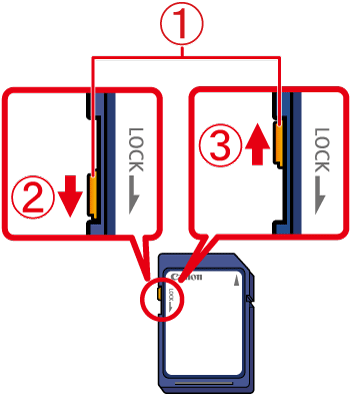
Cameras use SD cards to store photos and videos. Most SD cards have a small physical switch on their side. When this switch is set to “lock,” the card becomes read-only. You can view files, but you cannot save new ones or delete old ones.
Here’s a quick comparison of SD card switch positions:
| Switch Position | Result |
|---|---|
| Up | Unlocked (can write/delete) |
| Down | Locked (read-only) |
If your camera says “locked,” check this switch first. Sometimes, it gets moved accidentally while handling the card.
Common Causes For The Locked Message
Several reasons can trigger the locked error:
- Physical switch is set to lock. This is the most frequent cause.
- Broken or loose switch. If the switch is damaged, your card may stay locked even after moving it.
- Camera sensor issue. Some cameras misread the card’s status due to dust or hardware problems.
- Card adapter problems. MicroSD cards inside adapters can cause errors if the adapter’s switch is faulty.
Here’s a breakdown of causes and solutions:
| Cause | Solution |
|---|---|
| Physical switch locked | Move switch to unlock |
| Broken switch | Replace card or use tape to hold switch |
| Camera sensor dirty | Clean card slot gently |
| Adapter issue | Try a new adapter |
Credit: hk.canon
How To Fix Memory Card Locked Error
You can usually fix this error with simple steps:
- Remove the SD card from your camera.
- Examine the side switch. Slide it to the unlocked position.
- Reinsert the card and check if the message disappears.
- If the switch is loose, try taping it in place.
- Clean the card slot using compressed air if you suspect dust.
- Test with another SD card to rule out camera issues.
Non-obvious insight: Some SD cards become permanently locked after many uses. If your card is old, consider replacing it.
Avoiding Future Problems
Treat your SD cards gently. Avoid bending, dropping, or exposing them to moisture. Always store them in a case. If you use microSD cards with adapters, choose good quality adapters. Also, regularly backup your files to avoid losing precious photos.

Credit: www.reddit.com
Frequently Asked Questions
Why Does My Camera Show “memory Card Locked” Even After Unlocking The Switch?
The card’s switch may be broken or your camera’s slot might be dirty. Try another card or clean the slot.
Can I Fix A Broken Sd Card Lock Switch?
You can use a small piece of tape to hold the switch in the unlocked position. However, this is a temporary fix.
Does Formatting The Card Unlock It?
No. Formatting does not change the physical lock status. You must move the switch.
What Is The Difference Between Locked And Unlocked Sd Cards?
A locked card is read-only. An unlocked card lets you write, edit, and delete files.
Are All Memory Cards Affected By This Issue?
Mostly SD cards have this switch. CF cards and some microSD cards do not have a physical lock.
If you need more details, check the official SD Association guide at SD Association FAQ.
Understanding and fixing the “Memory Card Locked” error is simple. With careful handling, you can avoid this problem and keep your camera ready for every moment.